
This is a guest post by Crowstep Digital, a web design and local SEO agency based near Stirling that works with small businesses across Central Scotland.
Most small businesses only think seriously about backups on the day they need one. A laptop is left on a train, an office PC refuses to start, a member of staff deletes the wrong shared folder, or a suspicious email attachment encrypts every file it can reach. At that point there are only two kinds of business: those that can restore their files and carry on, and those that cannot.
The good news is that a sensible backup plan does not need to be complicated or expensive. This guide explains, in plain English, what a small firm in Falkirk, Stirling, Denny or anywhere in Central Scotland should back up, how the well-known 3-2-1 rule works, and how to check that your backups will actually help when something goes wrong.
Start by listing what you could not work without
Before choosing any software or hardware, spend twenty minutes writing down the information your business depends on. For most small firms the list looks something like this:
- Accounts, invoices and payroll records, whether in desktop software or a cloud package.
- Customer and supplier details, quotes, job sheets and contracts.
- Email, calendars and contacts.
- Shared documents, templates, price lists and photographs of finished work.
- Line-of-business software and its database, such as booking, stock or practice management systems.
- Your website, domain details and online listings.
Next to each item, note where it lives today: on one person’s laptop, on an office server, in Microsoft 365 or Google Workspace, or with a software supplier. This simple exercise often reveals that something important exists in only one place.
The 3-2-1 rule, explained simply
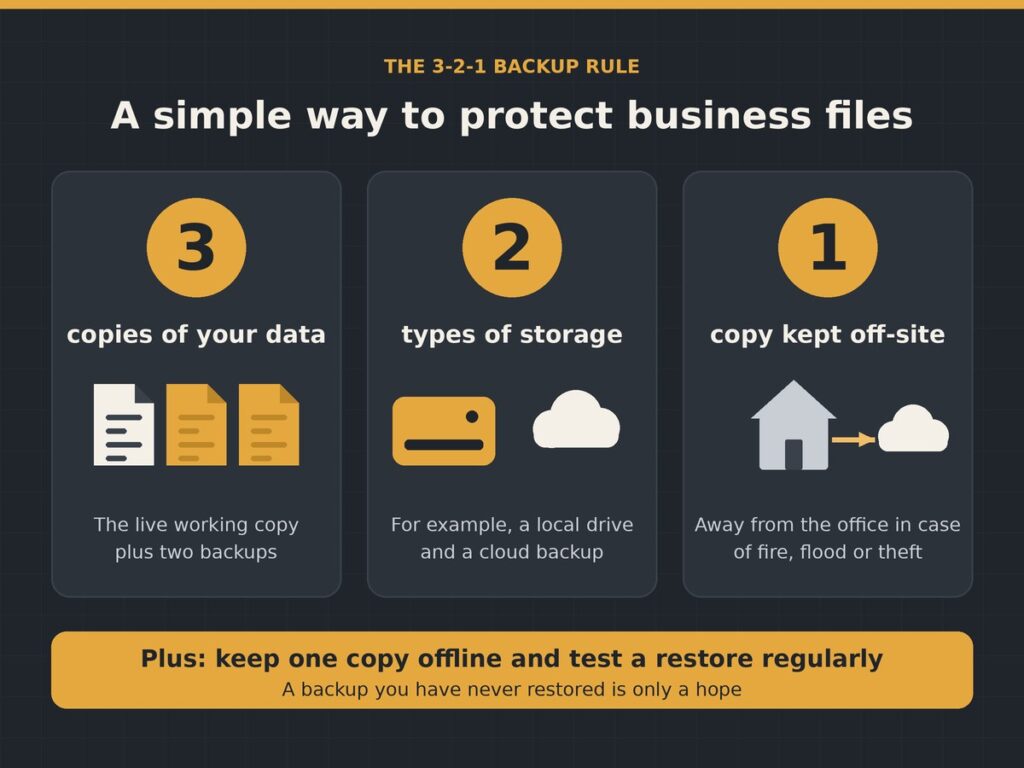
The 3-2-1 rule is a long-standing guideline used by IT professionals because it is easy to remember and covers the most common ways data is lost:
- 3 copies of your data: the live working copy plus two backups.
- 2 different types of storage: for example, an external drive or network storage device in the office and a cloud backup service, so a single faulty device or product cannot take out everything.
- 1 copy kept off-site: away from the building, so a fire, flood or break-in does not destroy the originals and the backups together.
Many businesses now add a further safeguard: at least one copy that cannot be changed or deleted from the everyday network, sometimes described as an offline or immutable backup. Ransomware typically tries to encrypt or delete any backup it can reach, so a copy that is disconnected, or protected by separate credentials, is far more likely to survive.
Cloud services are not automatically a backup
A common assumption is that files stored in Microsoft 365, OneDrive, SharePoint or Google Drive are already backed up. These services are very reliable at keeping files available, and they include recycle bins and version history, but they are designed mainly to keep your data running, not to give you long-term, independent copies.
Deleted items are only kept for a limited period, and if a file is deleted or encrypted on a synced laptop, that change can quickly sync to the cloud as well. Microsoft’s own services agreement recommends that customers regularly back up their content. A separate cloud-to-cloud backup of mailboxes, OneDrive and SharePoint closes that gap and is worth discussing with whoever looks after your IT. Centratec can help with Microsoft 365 and cloud services if you are not sure how your current setup is protected.
Decide how often, and how far back
Two simple questions shape every backup plan. First, how much work could you afford to redo if you lost everything since the last backup: an hour, a day, a week? That tells you how often backups should run. Second, how far back might you need to go? A file that was quietly corrupted or deleted three weeks ago is only recoverable if your backups keep older versions for longer than that.
For most offices, an automatic daily backup with several weeks of older versions is a sensible starting point, with more frequent backups for systems that change constantly, such as accounts or booking databases. The key word is automatic: backups that rely on someone remembering to plug in a drive on a Friday afternoon tend to stop happening.
Test a restore before you need one
A backup that has never been restored is really just a hope. Every few months, pick a handful of files and a folder, restore them to a different location, and open them. Check that the dates are what you expect and that nothing is missing. Make sure more than one person knows where the backups are, how to log in to the backup service and who to call for help.
It is also worth checking the backup reports or email alerts that most backup tools send. A backup job that has been failing silently for months is one of the most common discoveries after a data loss.
Your website and online listings are business data too
It is easy to forget that your website, its database and your online listings are also business assets. If your site were hacked or your hosting account closed, could you put it back? Ask whoever manages your site how often it is backed up, where those copies are stored and how quickly it could be restored. Keep a note of your domain registrar, hosting login and DNS details somewhere safe that does not depend on the website itself.
The same applies to your Google Business Profile, directory listings and review responses, which take time to build and are part of how local customers find you. When we talk to business owners about their online presence at Crowstep Digital, a Stirling web design and local SEO agency, a written record of who controls each account is one of the first things we suggest, because losing access to a listing or a domain can be just as disruptive as losing a hard drive.
Good habits that make backups work
- Keep work files in shared, backed-up locations rather than on individual desktops.
- Turn on multi-factor authentication for email, cloud storage and the backup service itself.
- Keep operating systems and software up to date so known security holes are closed.
- Remove access promptly when staff leave, and make sure their files are kept.
- Write a one-page recovery plan: what is backed up, where, how to restore it and who to contact.
When to get help
If a drive is clicking, a computer will not start or files have suddenly become unreadable, stop using the device. Continuing to run it, or installing recovery software onto the same drive, can make recovery harder. Make a note of what happened and speak to an IT professional before trying anything else.
Centratec is based in Denny and helps homes and businesses across Falkirk, Stirling and Central Scotland with data backup and recovery, cybersecurity and data protection and business IT maintenance. If you would like someone to look over how your business data is protected, contact Centratec to talk it through.